The Evoto alternative you pay for once
Fotoreto retouches portraits, colors whole shoots and gets photos ready to deliver, right in your browser. No credits and no per-photo fees. Pay $19.99 once and keep it.
Free plan, no account needed. Your photos never leave your device.
Why people look for an Evoto alternative
Evoto is a strong AI retouching app. The problem is how it charges. According to Evoto's pricing page (October 2026), each exported photo costs from 1 credit, and credit packs expire after a year. That means the more you deliver, the more you pay.
For a studio that delivers 300 photos a week, that is about 15,600 credits a year, every year. With Fotoreto, the same studio pays $19.99 once.
Pay once. Own it. We built Fotoreto because we think editing software should go back to the old deal: you buy the tool, and it's yours. No meter running on every photo you deliver.
Fotoreto vs Evoto at a glance
| Fotoreto | Evoto | |
|---|---|---|
| Pricing | Free to start. Premium $12.99 / year or $19.99 lifetime | Credit packs, from 1 credit per photo, valid 1 year |
| Cost of 15,600 photos / year | $19.99 once | At least 15,600 credits, bought again each year |
| Where it runs | In the browser: Windows, Mac, iPad, phones | Installed app for Windows and Mac |
| Where photos go | Processed on your device, never uploaded | See Evoto's policies |
| Account | Not needed for the free plan | Required to use credits |
| Color and culling | 111 color looks, Lightroom preset import, automatic culling | Focused on retouching |
Evoto details from evoto.ai at the time of writing (October 2026). Prices change; check Evoto's site before you compare.
The retouching tools you actually use
Fotoreto is made by a retoucher with more than ten years of client work. It covers the portrait tools used on almost every job:
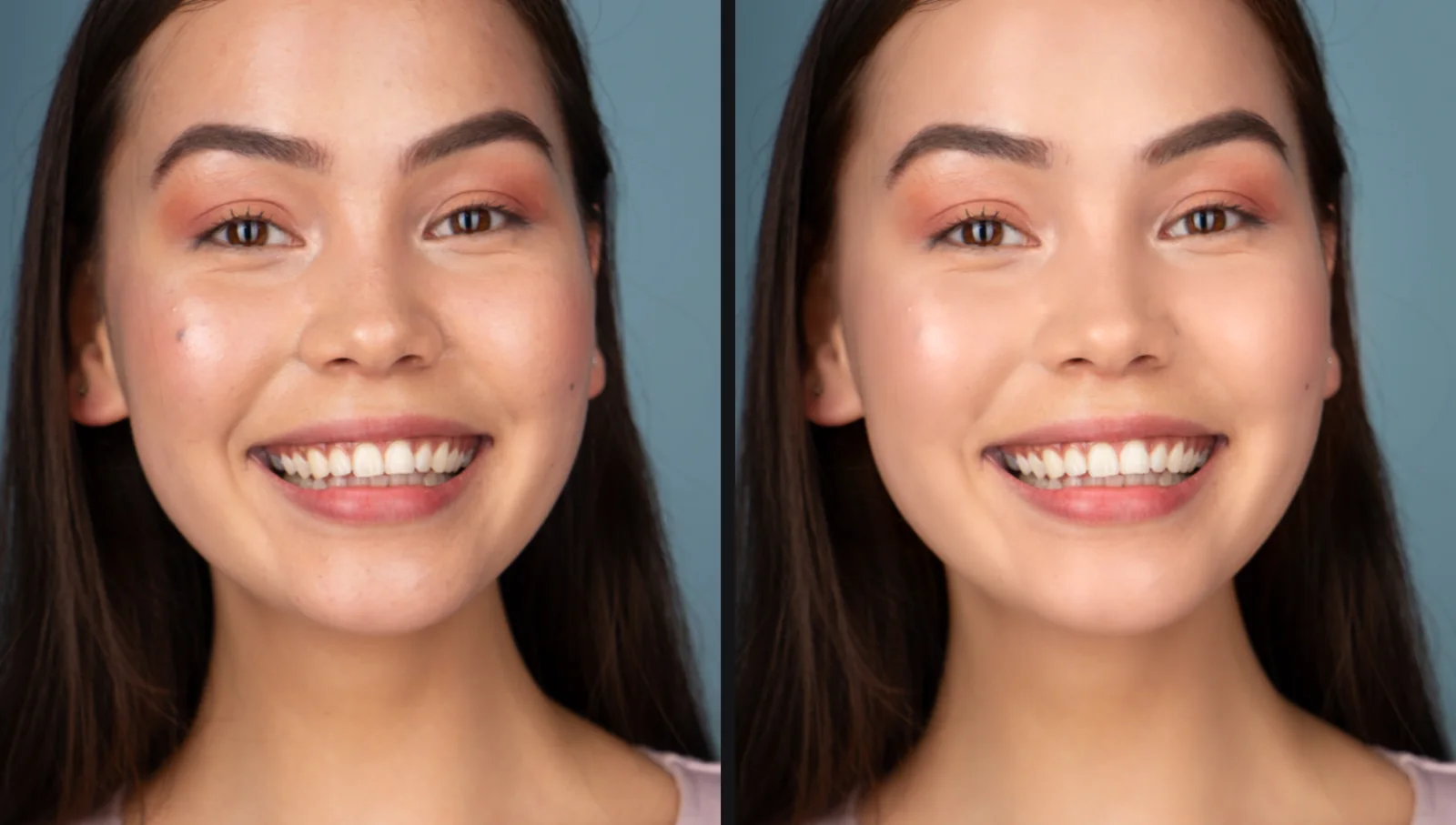
- Remove blemishes. The app circles each spot so you can review it. Keep moles and freckles if you want.
- Smooth skin that keeps pores, with separate control for forehead, cheeks and chin.
- Even skin tone, rosy skin, brighter eyes, whiter teeth.
- Match skin tone across a whole set from one sample photo, so the model looks the same in every frame.
- Face shaping, body reshaping, leg lengthening, hair fill (Premium).
- AI masks for facial skin, body skin, hair, lips, teeth, eye whites, irises and eyebrows. Brighten just the face, or change lip color, without painting.
Need deeper hand work? The Master plan (God mode) adds frequency separation, healing and clone brushes, dodge & burn by tonal range with Wacom pressure, and Photoshop-style color layers.
More than retouching: the whole shoot in one app
Evoto focuses on retouching. Fotoreto handles the rest of the job too:
- Cull first. Fotoreto flags blurry frames, duplicates and closed eyes before you start editing.
- Color the whole shoot. Edit one photo, sync the set, and every frame still gets its own exposure and white balance.
- 111 color looks, suggestions for each photo, your own
.cubeLUTs and Lightroom presets (.xmp). - 16-bit RAW from the major camera brands.
- Deliver. Export several sizes in one go (client preview, social media, print), with your studio logo.
Your client photos stay private
Everything in Fotoreto, the AI tools included, runs on your own device. Client photos are never uploaded to a server. That matters when you work with weddings, families, or anyone who did not agree to have their photos sent to the cloud.
Keep Evoto for the hard jobs, if you like
You don't have to choose one. Many retouchers cull and color the full shoot in Fotoreto, then send only the handful of frames the client picks to Evoto for heavy retouching. You spend a fraction of the credits and deliver the same quality.
How to switch in 5 minutes
- Open Fotoreto in Chrome, Edge or Safari. No install and no account.
- Drop in a folder of photos, RAW or JPEG.
- Try Remove blemishes and Smooth skin on one portrait.
- Import your Lightroom presets if you have them, or pick one of the 111 looks.
- Sync to the whole set and export.
Pricing
| Plan | Price | Best for |
|---|---|---|
| Free | $0, no account | Trying it: up to 10 photos per session, 16-bit RAW, masks, skin smoothing, blemish removal |
| Premium | $12.99 / year or $19.99 lifetime | Unlimited photos, culling, full retouching, all 111 looks, Lightroom preset import |
| Master (God mode) | $39.99 / year or $79.99 lifetime | Retouchers: healing and dodge & burn brushes, color layers, scopes, 16-bit export |
One-time payments. Nothing renews automatically. Full pricing
FAQ
Is Fotoreto a free Evoto alternative?
Yes, you can start for free with no account: the free plan includes 16-bit RAW, masks, skin smoothing and blemish removal, up to 10 photos per session. Premium removes the limit for a one-time $19.99.
Does Fotoreto charge per photo like Evoto credits?
No. Fotoreto never charges per photo. A 60-photo session and a 6,000-photo season cost the same.
Is Fotoreto's AI retouching as deep as Evoto's?
Evoto has a wider set of automatic AI retouching tools for heavy beauty work. Fotoreto covers the tools used on most portraits (blemishes, skin, skin tone, eyes, teeth, face and body shaping) and adds color, culling and delivery. For the heaviest jobs you can use both.
Do I need to install anything?
No. Fotoreto runs in Chrome, Edge and Safari on Windows, Mac, iPad and phones. You can also install it like an app, and it works offline after the first visit.
Are my photos uploaded?
No. All processing, AI included, happens on your device.
Can I use my Lightroom presets?
Yes. Import .xmp presets (Premium), including presets with AI masks.
Stop paying for every photo you deliver
Try Fotoreto free on your own shoot. No account, no card, and your photos stay on your device.